

优麦云-logo
enEnglish
Home
Web
Pricing
Blog
Help
Extension
Affiliate
Sign up for free
Demo
Log in
  1. Home
  2. >
  3. Help
  4. >
  5. Usage Help
  6. >
  7. 进销存
Quick Start
Quick StartEssential Guide for Beginners
Usage Help
Usage HelpEssential Guide to Key Features
Operations Insights
Operations InsightsIndustry News and Best Practices

优麦云帮助中心与用户操作指南——功能图文教程

预览
Please enter keywords

Help documentation

Getting Started

Getting Started

Authorization & Settings

Authorization & Settings

Sales Dashboard

Sales Dashboard

Advertising

Advertising

Business Insights

Business Insights

Inventory

Inventory

Monitor

Monitor

Customer Service

Customer Service

Finance

Finance

FBA Inventory

FBA Inventory

FBA Inventory

FBA Inventory

FIFO (First-In, First-Out)

FIFO (First-In, First-Out)

FAQs

FAQs

Mobile APP

Mobile APP

Browser Extension

Browser Extension

Subscription & Purchase

Subscription & Purchase

About SellerSpace

About SellerSpace
  1. Home
  2. >
  3. Help
  4. >
  5. Using Help
  6. >
  7. 进销存
FBA Inventory - FAQs

2025/07/30Views(9619)Reviews(0)

Q1: Does your Inventory Management system support uploading products?

A1: Currently, it does not support uploading products to Amazon. It only supports uploading and managing product and inventory information for your local warehouse.


Q2: How do I use First-In, First-Out (FIFO)?

A2: FIFO (First-In, First-Out) operates on the principle of issuing inventory that was received first. The cost of goods sold is calculated based on the cost of the earliest received inventory.

Example:

Batch 1: Cost $10, Freight $5, Total Quantity 100

Batch 2: Cost $5, Freight $3, Total Quantity 50

The system will sell out Batch 1 first, then start selling Batch 2.

Mainly solves:

The issue of varying purchase costs for different batches and different freight costs for different shipping methods, enabling accurate calculation of product costs and profit margins.


Operation Method:

1. Select Cost Calculation Method
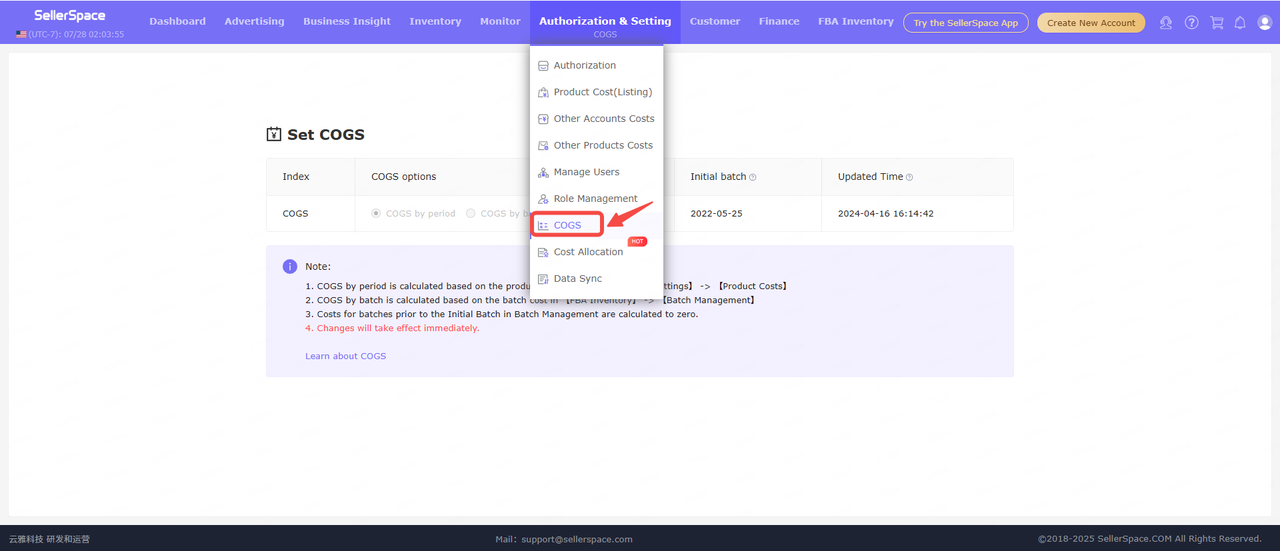

2. Set costs, freight, and other expenses for each batch
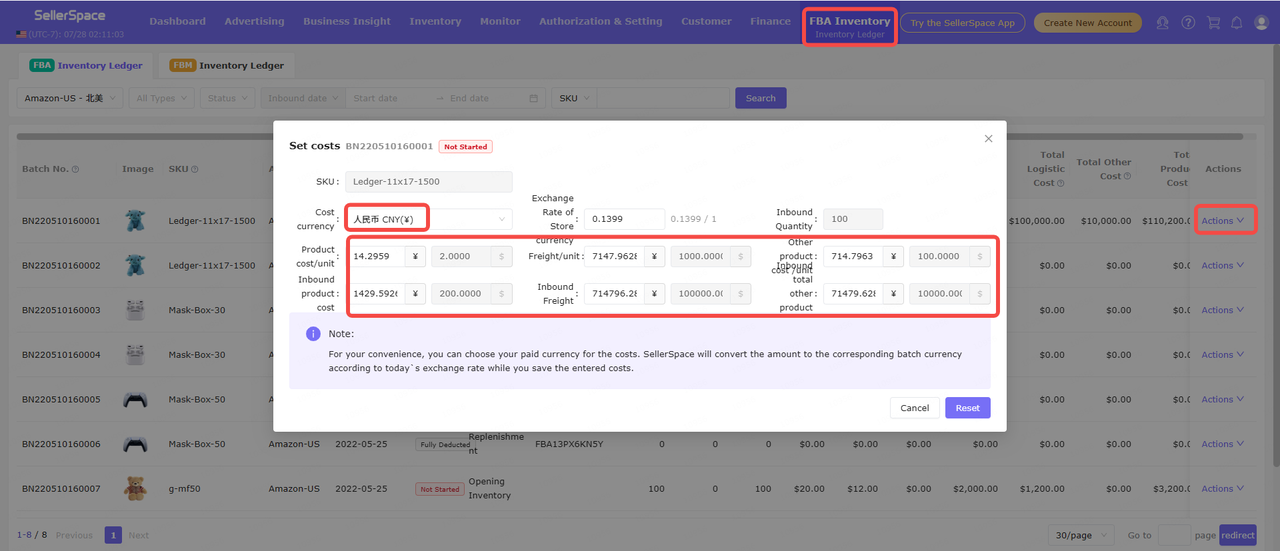


Q3: Can I download FBA shipment labels?

A3: FBA shipment labels need to be downloaded from your Amazon Seller Central account. Our ERP system currently integrates to synchronize FBA shipments, create shipping orders, and then warehouse personnel arrange shipments according to the quantities in the shipping orders.


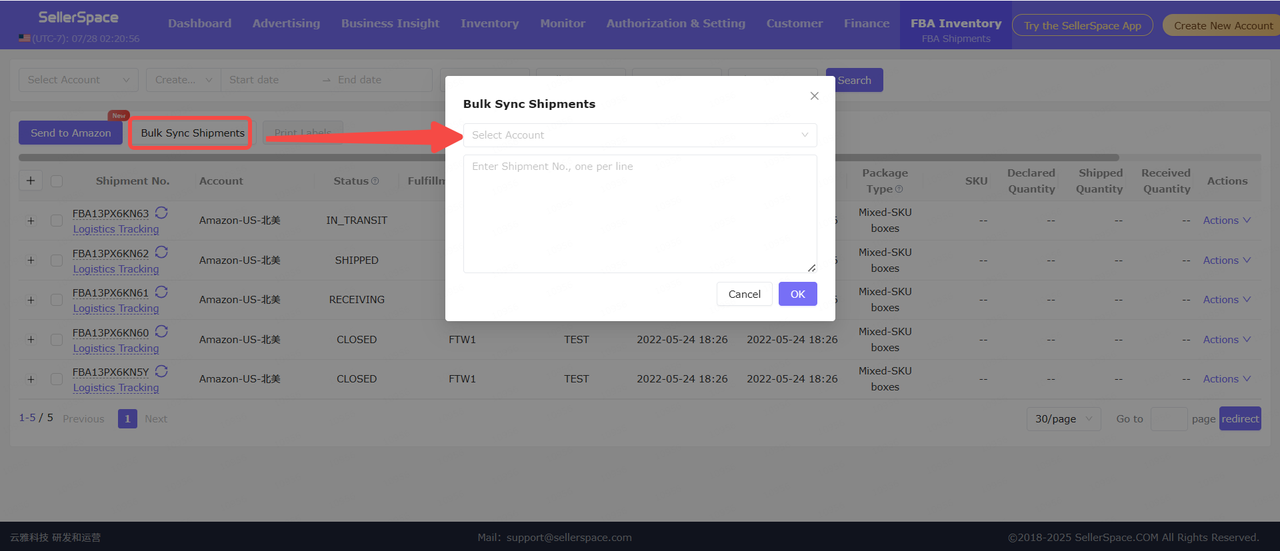
Q4: My FBA shipment is not synchronized to the system?

A4: FBA shipments are automatically synchronized once a day. If your shipment has not been synchronized, you can manually synchronize it.

Previous

Deduction Records

Next

Mobile App - Instruction

优麦云

SellerSpace is a concise tool to manage multiple Amazon accounts, focuses on solving various problems encountered by sellers during operating Amazon business.

About UsPrivacy PolicyTerms Of Service

Product

SellerSpace WebSellerSpace APPSellerSpace Extension

Novice on the road

HelpPricingWeb中文English日本語中文-繁體

Mail:support@sellerspace.com

©2018-2026 SellerSpace.COM All Rights Reserved

Online

Service