

优麦云-logo
enEnglish
Home
Web
Pricing
Blog
Help
Extension
Affiliate
Sign up for free
Demo
Log in
  1. Home
  2. >
  3. Help
  4. >
  5. Usage Help
  6. >
  7. 授权&设置
Quick Start
Quick StartEssential Guide for Beginners
Usage Help
Usage HelpEssential Guide to Key Features
Operations Insights
Operations InsightsIndustry News and Best Practices

优麦云帮助中心与用户操作指南——功能图文教程

预览
Please enter keywords

Help documentation

Getting Started

Getting Started

Authorization & Settings

Authorization & Settings

Authorize Amazon Account & Advertising

Authorize Amazon Account & Advertising

Authorize Advertising Alone

Authorize Advertising Alone

Revoke Account & Advertising Authorization

Revoke Account & Advertising Authorization

Data Synchronization Mechanism

Data Synchronization Mechanism

Data Verification Path

Data Verification Path

Store TimeZone

Store TimeZone

Product Costs

Product Costs

Other Account Costs

Other Account Costs

Other Product Costs

Other Product Costs

Users

Users

Role Management

Role Management

COGS

COGS

Cost Allocation

Cost Allocation

FAQs

FAQs

Sales Dashboard

Sales Dashboard

Advertising

Advertising

Business Insights

Business Insights

Inventory

Inventory

Monitor

Monitor

Customer Service

Customer Service

Finance

Finance

FBA Inventory

FBA Inventory

Mobile APP

Mobile APP

Browser Extension

Browser Extension

Subscription & Purchase

Subscription & Purchase

About SellerSpace

About SellerSpace

Catalogue

I. Target Audience
II. Feature Introduction
III. Usage Scenarios
IV. Operation Guide
  1. Home
  2. >
  3. Help
  4. >
  5. Using Help
  6. >
  7. 授权&设置
COGS

2025/07/14Views(17685)Reviews(0)

I. Target Audience

Business Owners, Operators


II. Feature Introduction

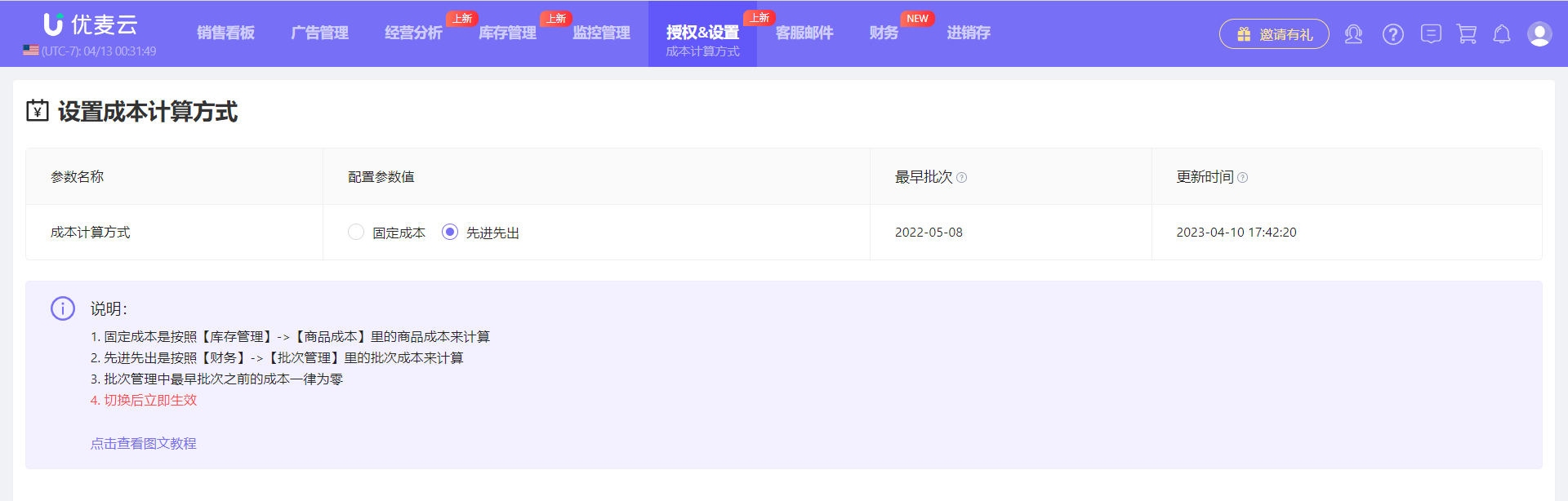
When SellerSpace calculates profit, the corresponding product costs – purchase cost, inbound shipping fees, and other costs – can be calculated using either the COGS by period or COGS by batch.


COGS by period: Manually add the product cost for orders on the corresponding date through the Product Cost feature. Click to learn how to add product costs

FIFO (First-In, First-Out) Algorithm: When calculating the cost of goods sold for FBA orders, the system automatically and precisely tracks the cost for each shipment batch. You can view batch information and deduction details for corresponding inventory through the Batch Management and Deduction Records features, and reconcile with the Profit Report. You can also reset the cost of individual deduction batches to calculate profit more accurately. Click to learn how to reset batch costs


If COGS by batchm is used, the system will automatically start calculating and deducting costs from the earliest batch inventory in Batch Management. Product costs before the earliest batch will be considered as 0.


III. Usage Scenarios

- Switch between different cost calculation methods when calculating profit


IV. Operation Guide


Changes to the cost calculation method will take effect immediately and be applied to profit calculations in features such as the Homepage Dashboard, Real-Time Sales, Sales Overview, Product Analysis, and Marketplace Analysis.


The method to switch cost calculation methods is as follows:
功能教程截图+


Previous

Role Management

Next

Cost Allocation

优麦云

SellerSpace is a concise tool to manage multiple Amazon accounts, focuses on solving various problems encountered by sellers during operating Amazon business.

About UsPrivacy PolicyTerms Of Service

Product

SellerSpace WebSellerSpace APPSellerSpace Extension

Novice on the road

HelpPricingWeb中文English日本語中文-繁體

Mail:support@sellerspace.com

©2018-2026 SellerSpace.COM All Rights Reserved

Online

Service